


(Same instructions for F9 and F10)
It's that time of year again, so let's waste cpu resources in a completely unnecessary way.
xsnow is straightforward, the FC3 rpm (X86_64 version) still works in F8,F9 and F10 with a small symlink required
To start use 'xsnow &', and to stop use 'killall xsnow', see the man page for a surprisingly long list of options.Code:rpm -Uhv xsnow-1.42-15.i386.rpm ln -s /usr/X11R6/bin/xsnow /usr/bin/xsnow
xglsnow is a little sexier (but not that much), unfortunately the latest version available at http://cornergraf.net/projects/xglsnow/ won't compile, but download it anyway as it contains a nice texture to use for the snow (edit, this texture is no longer needed in F10) , also see that page for links to suitable backgrounds (slight overkill if you ask me)
Instead we'll get a snapshot from gitweb.opencompositing.org, first we need compiz-fusion, for gnome this is the list of required packages (others will be installed as dependencies, ~5.2Mb in total)
If you have problems then try leigh123's unofficial repository, many seem to have success with that.Code:yum install compiz-fusion-gnome compiz-fusion-extras-gnome emerald-themes fusion-icon-gtk compiz-bcop
(for kde substitute kde packages and fusion-icon-qt)
Now you can start compiz-fusion from Applications->System Tools->Compiz Fusion Icon, a helpful blue cube icon should appear in the top panel, use this for management and configuration.
Now we install some development packages
Now get the latest xglsnow snapshot from http://gitweb.opencompositing.org/?p...n/plugins/snow, then compile and install (don't do this as root, you want the install in your own home directory not root's)Code:yum install make libtool gcc wget compiz-devel compiz-fusion-devel
EDIT In F10 use this snapshot
EDIT In F8, try an older snapshot like this one, which compiles on a fresh F8 install with just a few non-fatal warnings
NB if you haven't set up sudo then run the last command asCode:tar xvf snow-*.tar.gz cd snow make sudo make install
you''ll need root password (If you just use 'su -c' it will install in /root not your own home directory)Code:su -pc 'make install'
Now run ccsm by right-clicking the blue fusion-icon and selecting 'Settings Manager', Snow is an effect available under 'Extras', enable it and click the snowflake icon to get options. You may need to add a texture (if you used an old snapshot), a suitable one is from http://cornergraf.net/projects/xglsnow mentioned above, in the xglsnow tarball there is an image called snowflake2.png.
Hit Super + F3 to toggle snow on/off. If the super key is not mapped to the windows key, then you can change this setting in the options for the plugin (to, eg, Shift + F3) under the 'Actions' tab.
NOTE you need to reload the window manager if the effect doesn't start (select 'Reload Window Manager' from the fusion-icon menu)
Happy Holidays!
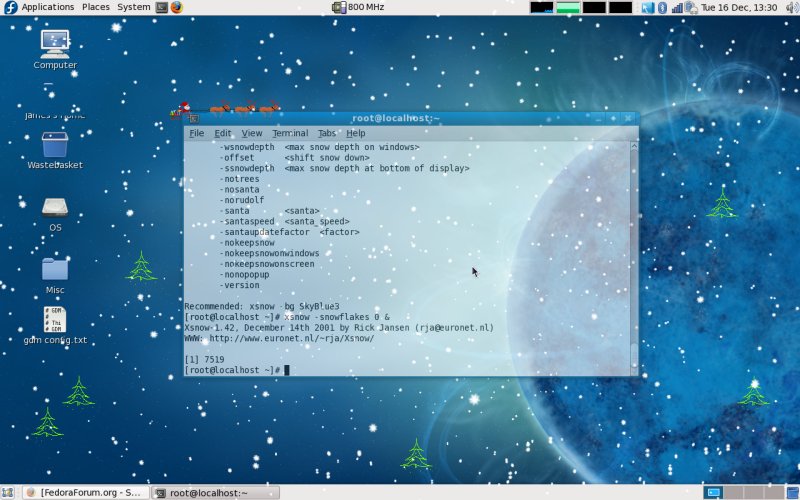
EDIT, you can run xsnow & xglsnow together, eg to get the santa from xsnow (and turn off all the snow in xsnow, 'xsnow -snowflakes 0 &') see attachment
Results 1 to 8 of 8
-
21st December 2007, 05:00 PM #1
 Retired User
- Join Date
- Oct 2004
- Location
- London, UK
- Posts
- 4,991
- Mentioned
- 0 Post(s)
- Tagged
- 0 Thread(s)
xsnow and xglsnow in Fedora 8
Last edited by sideways; 16th December 2008 at 02:52 PM.
-
21st December 2007, 05:18 PM #2
"Sean The Terrible" -- The forum(er) Vista® rep
- Join Date
- Nov 2005
- Posts
- 8,819
- Mentioned
- 0 Post(s)
- Tagged
- 0 Thread(s)
Thats all well and fine, but I seem to have a problem with the snow. I get a bunch of little mini-jn4's instead of snow? Help?

-
21st December 2007, 05:26 PM #3
Retired User
- Join Date
- Oct 2004
- Location
- London, UK
- Posts
- 4,991
- Mentioned
- 0 Post(s)
- Tagged
- 0 Thread(s)
That actually looks ok!
But to get something more snowlike you need to add an appropriate texture in the 'Textures' tab option for the snow plugin, there's a suitable png called snowflake2.png in the xglsnow tarball at http://cornergraf.net/projects/xglsnow/Last edited by sideways; 21st December 2007 at 05:33 PM.
-
16th December 2008, 12:38 PM #4
Administrator - (On Leave)
- Join Date
- Aug 2007
- Location
- London Postbox (the red one)
- Age
- 61
- Posts
- 3,868
- Mentioned
- 0 Post(s)
- Tagged
- 0 Thread(s)
xsnow
Guess it wouldnt be Christmas without xsnow so here it is again

The rpms are available here
http://dnmouse.org/fedora/Dave/
To install xsnow
Now just type xsnow in a terminalsu
rpm -ivh /path/to/xsnow.rpm
ln -s /usr/X11R6/bin/xsnow /usr/bin/xsnowLast edited by Dangermouse; 16th December 2008 at 12:50 PM.
-
16th December 2008, 12:47 PM #5
Registered User
- Join Date
- Mar 2008
- Posts
- 179
- Mentioned
- 0 Post(s)
- Tagged
- 0 Thread(s)
Thanks! I'll have to see how it works with KDE 4 though, I've been putting up with the KWin Snow...
-
16th December 2008, 02:08 PM #6
Retired User
- Join Date
- Oct 2004
- Location
- London, UK
- Posts
- 4,991
- Mentioned
- 0 Post(s)
- Tagged
- 0 Thread(s)
Don't forget xglsnow
You can run it together with xsnow to get the santa, just turn off flakes in xsnow first
-
16th December 2008, 02:21 PM #7
Administrator - (On Leave)
- Join Date
- Aug 2007
- Location
- London Postbox (the red one)
- Age
- 61
- Posts
- 3,868
- Mentioned
- 0 Post(s)
- Tagged
- 0 Thread(s)
Last edited by Dangermouse; 16th December 2008 at 02:26 PM.
-
16th December 2008, 02:37 PM #8
Retired User
- Join Date
- Oct 2004
- Location
- London, UK
- Posts
- 4,991
- Mentioned
- 0 Post(s)
- Tagged
- 0 Thread(s)
Sorry about the large size of the attachments above, I would resize them but the attcahment feature isn't working at the moment, In case you don't want to waste the bandwidth here's a smaller sized image (76k)

 Reply With Quote

 Originally Posted by sideways

